We have all experienced it. You are stuck in evening traffic on Shahrah-e-Faisal in Karachi, or cruising the winding roads up to Hunza, completely lost in your favorite playlist. Suddenly, a jarring 30-second advertisement completely ruins the vibe.
While the free version of Spotify is a fantastic way to discover new music, dealing with forced shuffle mode and constant ad interruptions gets old incredibly fast. For music lovers in Pakistan, upgrading to Spotify Premium is an absolute game-changer. It unlocks studio-quality lossless audio, unlimited skips, and the ability to download thousands of songs for offline listening—a true lifesaver during load-shedding or when traveling to low-signal areas up north.
However, if you have ever actually tried to purchase it, you already know the struggle. International payment gateways in Pakistan can be highly frustrating. Consequently, social media groups are filled with people asking the same exhausted questions: “Can I just use my EasyPaisa?”, “Why is my Meezan Bank card declining?”, or “How do I pay with my Telenor balance?”
You are in exactly the right place. In this comprehensive, expertly researched guide for apkfox, we will break down exactly how to buy Spotify Premium in Pakistan. We will bypass the common errors, explain banking limitations, and show you 100% secure, officially supported local payment methods.

Why Upgrade? Spotify Free vs. Premium
Before pulling out your wallet, it helps to understand exactly what you are paying for. Spotify Premium is not just about removing ads; it fundamentally changes how you interact with the app.
| Feature | Spotify Free | Spotify Premium |
|---|---|---|
| Advertisements | Audio and banner ads every few songs. | 100% Ad-free listening. |
| Playback Control | Forced shuffle mode on mobile devices. | Pick and play any song on demand. |
| Track Skips | Limited to 6 skips per hour. | Unlimited skips. |
| Offline Downloads | Podcasts only. | Download up to 10,000 songs per device. |
| Audio Quality | Standard (up to 160 kbps). | Maximum/Lossless (up to 320 kbps+). |
| Multi-Device Control | Basic functionality. | Full access to Spotify Connect (TVs, speakers). |
Spotify Premium Price in Pakistan (2026)
Fortunately, Spotify utilizes localized pricing. This means a Premium subscription in Pakistan is aggressively discounted compared to the US or UK markets, making it incredibly affordable for the local audience.
Furthermore, Spotify offers four distinct tiers tailored to different listening habits.
Important Note: The prices below are in Pakistani Rupees (PKR). Depending on your province, a minor provincial sales tax (PST/PRA) on digital services might add a few extra rupees to your final monthly bank deduction.
| Premium Plan | Monthly Price (PKR) | Number of Accounts | Best Suited For |
|---|---|---|---|
| Student | Rs. 199 | 1 | University/College students (requires verification). |
| Individual | Rs. 379 | 1 | Solo listeners who want ultimate control. |
| Duo | Rs. 519 | 2 | Couples or roommates sharing an address. |
| Family | Rs. 679 | Up to 6 | Families under one roof. Includes Kids app access. |
Pro Tip: Spotify frequently runs introductory promotions. If you are a brand-new user, always check the app or website first—you might be eligible for 1 to 3 months of Premium for absolutely free!
The “PayPak” Problem (Crucial Banking Info)
Before we look at the exact steps to buy your subscription, we must address the number one reason payments fail in Pakistan: The PayPak limitation.
By default, to support local financial infrastructure, many Pakistani banks (like Meezan, Bank Alfalah, and HBL) issue PayPak debit cards to new account holders.
- The Issue: PayPak is a domestic payment scheme. It only works on Pakistani ATMs and local POS machines. It does not support international online transactions.
- The Solution: Spotify is an international merchant. To pay for Spotify, you must ensure your debit or credit card has a Visa or Mastercard logo on the front. If you only have a PayPak card, you cannot use it for Spotify. You must request a Visa/Mastercard replacement from your bank, or use one of the alternative methods below.
Step-by-Step: How to Buy Spotify Premium
To purchase your subscription safely, you must use a payment channel officially supported by Spotify’s global payment gateway. Let’s break down the three most reliable methods in Pakistan.
Method 1: Using NayaPay or SadaPay (Highly Recommended)
If you want to avoid calling bank helplines and dealing with declined transactions, Pakistani fintech apps like NayaPay and SadaPay are your best bet. These apps provide free, instant virtual Visa/Mastercard debit cards that are specifically designed to work flawlessly on international platforms like Spotify, Netflix, and Google Play.
- Fund Your Wallet: Transfer the required amount (e.g., Rs. 400 for the Individual plan) from your regular bank account to your NayaPay or SadaPay wallet via IBFT.
- Open Spotify: Launch the official Spotify app on your phone or log in at
spotify.com/pkvia your browser. - Navigate to Premium: Tap the Premium icon located in the bottom right corner of the mobile app.
- Choose Your Plan: Select Individual, Student, Duo, or Family, then tap Get Premium.
- Select Payment Option: Choose Credit or Debit Card.
- Enter Card Details: Open your NayaPay/SadaPay app, tap on your virtual card to reveal the numbers. Carefully type the 16-digit card number, expiry date, and CVV into the Spotify checkout page.
- Confirm and Enjoy: Tap Buy Now. The funds will be deducted instantly, and your Premium features will activate immediately.
Method 2: Using Mobile Carrier Billing (Zong or Telenor)
Do you lack a bank account entirely? No problem. Spotify officially supports Direct Carrier Billing (DCB) in Pakistan, allowing you to pay directly through your active mobile phone balance. Currently, this is heavily supported by Zong and Telenor.
- Recharge Your Sim (Read Carefully): First, ensure you have sufficient prepaid balance. Crucial Note: Because of Pakistani telecom taxes (Withholding Tax and FED), a Rs. 379 plan will cost more than Rs. 379 in mobile balance. We strongly recommend having at least Rs. 500 to 550 in your prepaid balance to ensure the transaction doesn’t fail due to insufficient tax coverage.
- Select the Plan: Open Spotify and select your desired Premium tier.
- Choose Carrier Billing: On the checkout screen, tap on Pay by Mobile (or tap the specific Zong/Telenor network logo if prompted).
- Enter Your Number: Type in your active Pakistani mobile number.
- Verify via PIN: You will instantly receive an SMS containing a 4-digit verification PIN. Enter this PIN on the Spotify screen to authorize the transaction.
- Activation: The total amount (price + telecom tax) will be deducted from your balance, and your Premium account will go live.
Method 3: Using Traditional Bank Cards (HBL, Meezan, UBL, etc.)
Using a standard Visa or Mastercard from a traditional bank works perfectly, but there is one massive hurdle: the State Bank of Pakistan’s e-commerce block.
To prevent international fraud, most Pakistani banks disable international online transactions by default. If you try to pay without fixing this, Spotify will say your card is declined.
- Activate E-Commerce Sessions: Before opening Spotify, you must enable online shopping.
- Via App: Log into your banking app (like HBL Mobile or Meezan App), go to “Card Management,” and toggle on Internet/E-commerce Transactions.
- Via Helpline: Call your bank’s helpline (e.g., dial 111-331-331 for Meezan Bank) from your registered number. Tell the representative: “Please activate online international sessions on my debit card.”
- Go to Checkout: Once the session is active, open Spotify and select your plan.
- Enter Details: Choose Credit or Debit Card and input your name, Visa/Mastercard number, expiry date, and the 3-digit CVV from the back of the card.
- Enter OTP: Your bank will send a One-Time Password (OTP) via SMS or email. Enter it on the secure gateway to finalize the purchase.
Method 4: By Third Party Resellers
You can also buy the Spotify premium along with many more subscriptions from trusted resellers in Pakitsan. One of these resellers include the SubStore PK. They are authentic and provide warranty for their subscriptions.
The Truth About Using JazzCash and EasyPaisa
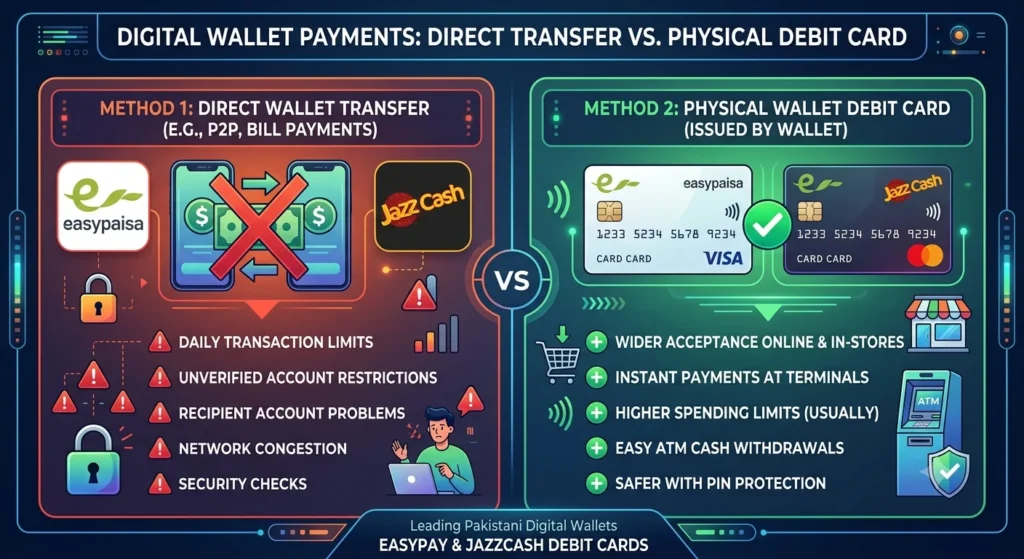
This is arguably the most common point of confusion on Pakistani tech forums. Can you buy Spotify Premium with EasyPaisa or JazzCash?
The answer is: Yes, but not the way you think.
- The Wrong Way: You cannot open the EasyPaisa or JazzCash app, tap “Send Money” or “Online Payment,” and send money directly to Spotify. Spotify’s global checkout does not natively integrate with these local wallet transfer buttons.
- The Right Way: Both EasyPaisa and JazzCash allow you to order physical and virtual Mastercard or Visa Debit Cards from within their apps. Once you generate or order one of these cards, you simply take the 16-digit card number and type it into Spotify’s “Credit or Debit Card” checkout page exactly as you would with a regular bank card. It works flawlessly.
How to Get the Spotify Student Discount in Pakistan
If you are a university student, paying full price for Spotify is unnecessary. The Rs. 199 Student Plan is the best bargain in digital streaming. Here is how to claim it legitimately:
- Ensure Eligibility: You must be enrolled in a higher education institution (University/College) recognized by the Higher Education Commission (HEC) of Pakistan.
- Select the Plan: Go to the Premium section on Spotify’s website and select the Student plan.
- SheerID Verification: You will be redirected to a third-party portal called SheerID. Spotify uses this service globally to verify student status.
- Upload Documents: You will need to provide proof of enrollment. This can be a clear picture of your current, valid university ID card, an official enrollment letter, or a recent transcript showing your name and the current semester dates.
- Wait for Approval: SheerID usually verifies documents within an hour (though it can take up to 48 hours). Once approved, you will receive an email allowing you to complete the Rs. 199 checkout process. You will need to re-verify this status every 12 months.
Warning: Beware of “Lifetime Premium” Scams
Because paying for international digital services used to be so difficult in Pakistan, a massive digital black market emerged. If you scroll through Facebook groups, Instagram, or WhatsApp statuses, you will inevitably see ads screaming: “Spotify Premium Lifetime Account for only Rs. 500!”
Do not fall for this trap. It is a scam.
Here is why you must avoid these sellers at all costs:
- Lifetime Plans Do Not Exist: Spotify is a strictly subscription-based publicly traded company. They do not offer “lifetime” plans anywhere in the world.
- They Use Stolen Credentials: These sellers usually use stolen credit cards to buy Premium, or they exploit Family plan slots by grouping strangers together using fake foreign addresses.
- You Will Lose Everything: Spotify has advanced anti-fraud algorithms that actively sweep for these fraudulent accounts. Within a few weeks or months, the payment will bounce, or the geographic discrepancy will be flagged. Your account will be permanently banned. You will lose your money to the scammer, and worse, you will lose all the playlists and algorithms you spent years curating.
Always stick to the official Spotify app and pay through their official checkout gateway.
Frequently Asked Questions (FAQs)
Why is my Meezan Bank card being declined on Spotify?
As a strict Islamic bank, Meezan Bank restricts international e-commerce by default to protect users. You must log into your Meezan mobile app, navigate to card settings, and activate your internet session before trying to pay on Spotify. Furthermore, ensure you have a Visa or Mastercard; Meezan PayPak cards will not work.
Can I use a VPN to get Spotify cheaper from another country?
No, and there is no reason to. First, Spotify cross-checks the issuing country of your credit card with your IP address. If you use a Pakistani debit card while connected to a Turkish VPN, the transaction will be blocked. Second, Pakistani pricing (Rs. 379) is currently among the most affordable Spotify rates in the entire world!
How much tax is applied to the Spotify Premium price in Pakistan?
If paying by a bank card, the price is generally accurate to the advertised rate, though some provinces apply a small digital services tax (around 4-5%). Furthermore, your bank might charge a tiny percentage for currency conversion or international transaction fees. If paying via mobile balance (Zong/Telenor), you must account for standard telecom withholding taxes, meaning you need significantly more balance than the base price.
How do I cancel my Spotify subscription?
Canceling is incredibly easy, and there are absolutely no hidden cancellation fees. Log into spotify.com on your mobile or desktop browser (Note: you cannot cancel from within the smartphone app itself). Go to Account Settings > Manage your plan, and click Cancel Premium. You will keep your Premium features until your current billing month runs out.
Final Thoughts
Buying Spotify Premium in Pakistan is no longer the frustrating headache it used to be just a few years ago. Thanks to the rapid rise of fantastic local fintech applications like SadaPay and NayaPay, alongside direct mobile carrier billing from networks like Telenor and Zong, upgrading your music experience takes less than two minutes.
For roughly the price of a single cup of coffee, you can completely reclaim your listening experience. Say goodbye to frustrating audio ads, stop worrying about draining your mobile data by utilizing offline downloads, and immerse yourself in the high-fidelity sound that your favorite artists intended.
(If you are looking for more ways to optimize your digital life and discover new applications, be sure to browse our latest guides on apps right here on apkfox.com.pk!)