Qwen Studio APK Download – Latest Version for Android
Now
61.9MB
V7.1.3
Android 7+
710

Description
Artificial intelligence apps are becoming an important part of everyday smartphone use, and Qwen Studio is one of the AI assistants worth watching in 2026.
Developed by Alibaba Cloud, it is available for Android and is designed to work as an AI assistant for everyday tasks, work, study, research, and creative projects. Its current Google Play listing shows 5M+ downloads and more than 13,000 reviews, demonstrating that the app has already gained significant Android adoption.
If you’re searching for Qwen Studio APK, this guide covers the app’s features, Android installation, safety considerations, supported capabilities, and everything you should know before downloading it.
Also Check: ChatGPT app
What Is Qwen Studio?
It is an AI-powered assistant developed by Alibaba Cloud.
The application is designed to help users with questions, research, writing, learning, problem-solving, and other everyday tasks. Its Google Play description positions it as a personal AI assistant, office helper, and study companion.
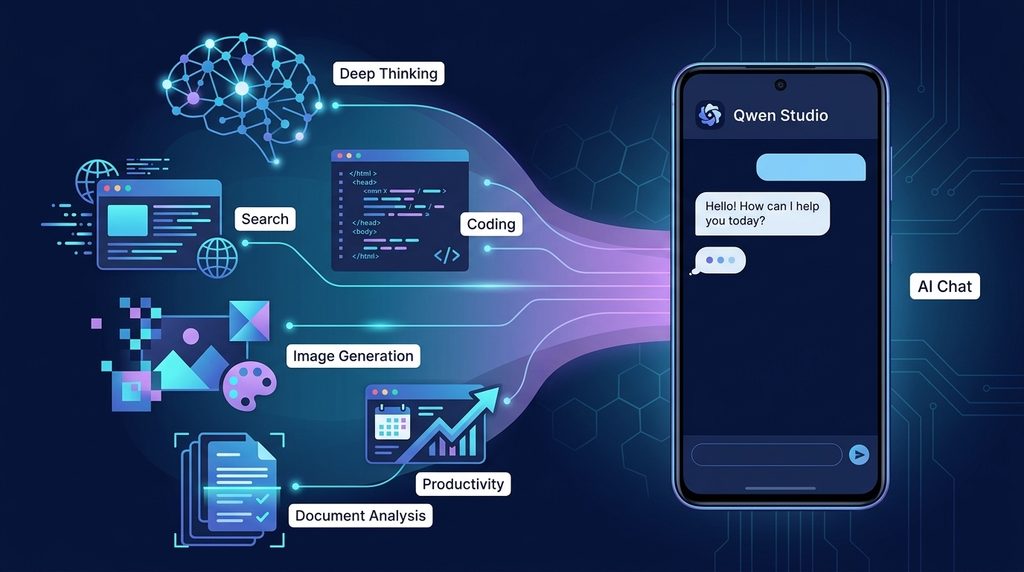
One of the reasons the app stands out is that it isn’t limited to basic text conversations. Its listed capabilities include deep thinking, intelligent search, multimodal AI, and other AI-powered functions.
This makes the application useful for students, professionals, developers, researchers, and content creators.
Qwen Studio APK Information
| Information | Details |
|---|---|
| App Name | Qwen Studio |
| Developer | Alibaba Cloud |
| Platform | Android |
| Category | AI / Productivity |
| Package Name | ai.qwenlm.chat.android |
| Downloads | 5M+ on Google Play |
| Rating | Around 4.2★ |
| Content Rating | Everyone |
| Developer | ALIBABA CLOUD (SINGAPORE) PRIVATE LIMITED |
The package name and developer information can be verified from the current Google Play listing.
Why Is Qwen Studio Getting Attention?
The AI market is already crowded with well-known applications, but it takes an interesting approach by combining several AI capabilities within one Android app.
The application offers features for reasoning, web search, study, work, and creative tasks. The official Google Play description specifically highlights its deep-thinking and search capabilities.
For Android users who want to experiment with a different AI assistant, this makes Qwen Studio APK an interesting search.
Main Features of Qwen Studio
1. Deep Thinking
It includes a Deep Thinking capability powered by QwQ.
According to the Google Play listing, this feature is intended for advanced reasoning and problem-solving and can use real-time internet data when providing solutions.
This can be useful when dealing with complicated questions rather than simple fact-based requests.
2. Intelligent Search
It also provides an AI-powered search function.
Users can search for information, resources, ideas, recipes, trends, and other subjects through the application. The app description says its search system uses filtering and contextual understanding to provide relevant results.
As with any AI search tool, important information should still be checked against reliable sources.
3. AI Chat
At its core, the app provides an AI conversation experience.
You can ask questions, request explanations, brainstorm ideas, or use the assistant for everyday tasks.
The conversational format makes it possible to continue asking follow-up questions instead of entering a completely new search query every time.
4. Multimodal Capabilities
Modern AI assistants increasingly support more than text, and it is designed around multimodal interaction.
This can make it useful when working with information that isn’t available purely as written text.
Depending on the current version and feature availability, users may encounter capabilities involving images and other media.
5. Image Generation
Qwen’s AI ecosystem also includes image-generation capabilities.
This makes the platform potentially useful for people who want to create visual concepts, social-media content, illustrations, or other AI-generated images.
Because AI features can change between releases, always check the current version for the capabilities available on your account and device.
6. Video Features
AI video creation is another area associated with Qwen’s expanding toolset.
For content creators, having AI tools for text, images, and video in the same ecosystem can make content-production workflows more convenient.
7. Coding Assistance
It can also be useful for developers and students learning programming.
You can ask AI to explain programming concepts, identify possible errors, generate example code, or help you understand how a particular function works.
However, generated code should always be tested before being used in a real project.
8. Study Assistance
Students can use an AI assistant for explanations, brainstorming, revision, and learning support.
For example, you can ask it to explain a difficult concept in simpler language or help create practice questions.
AI should be treated as a learning aid rather than an unquestioned source of academic information.
What Can You Do With Qwen Studio?
It can be used for many everyday tasks, including:
- Answering questions
- Explaining difficult topics
- Brainstorming ideas
- Writing and rewriting
- Research assistance
- Programming help
- Study assistance
- Creative projects
- AI image tasks
- Information searching
- Productivity tasks
This range of uses is one of the main reasons AI assistant apps are becoming popular on Android.
Qwen Studio APK Download and Installation
If you’re searching for Qwen Studio APK download, the safest approach is to verify the application before installing anything.
The official Android application is available through Google Play, where it is listed under the package name ai.qwenlm.chat.android and identifies Alibaba Cloud as its developer.
If you choose to install an APK manually, follow these precautions.
Check the Developer
Confirm that the application is associated with Alibaba Cloud.
An APK using its name but coming from an unknown developer should be treated cautiously.
Check the Package Name
The official Google Play listing identifies the package as:
ai.qwenlm.chat.android
Comparing package information can help you identify applications that may be pretending to be the official app.
Check the Version
Before installing an APK, check its version number and release information.
Avoid assuming that a page labeled “latest version” is actually offering the newest release. APK pages should be updated whenever a new version becomes available.
Review Permissions
Always review the permissions requested by an application.
If an APK requests access that seems unrelated to its advertised functionality, investigate before continuing with installation.
Use Reliable Sources
Google Play or official developer distribution channels are preferable to unknown APK mirrors.
If you’re learning more about how to identify a safe Android app, our existing APKFox guide on identifying safe or fake Android earning games provides additional practical checks.
Is Qwen Studio APK Safe?
The answer depends on where the APK comes from.
The official android application is published by Alibaba Cloud on Google Play. The current Play listing also states that data is encrypted in transit and that users can request deletion of their data.
However, a third-party APK can potentially be modified after it leaves the developer’s official distribution channel.
For that reason, be particularly careful with files advertised as:
- Qwen Studio Mod APK
- Qwen Studio Premium Unlocked
- Qwen Studio Pro Crack
- Qwen Studio Unlimited APK
Claims such as these should not automatically be trusted.
For more Android app safety tips, check our detailed guide on recognizing fake and unsafe applications.
Qwen Studio APK vs. Official Android App
There is an important distinction between the term “APK” and the application itself.
An APK is the Android application package used to install an application. The official app can be distributed as an APK, but that doesn’t mean every APK carrying the Qwen Studio name is genuine.
The important things to verify are:
- Developer
- Package name
- Version
- Source
- Permissions
- File authenticity
This is especially important when downloading applications outside Google Play.
Qwen Studio Latest Version
It is an actively maintained application, so the latest version can change over time.
The current Google Play listing shows 5M+ downloads and a current rating of approximately 4.2 stars, with more than 13,000 reviews.
If you’re maintaining a Qwen Studio APK page, update the version information whenever a new release becomes available.
A useful download page should display:
- APK version
- Update date
- File size
- Android compatibility
- Package name
- Developer name
- Changelog, if available
This information is more useful to visitors than simply writing “latest version” in the title.
Advantages of Qwen Studio
There are several reasons Android users may want to try Qwen Studio:
Multiple AI Functions
The app combines AI conversation with reasoning and search capabilities.
Useful for Study
Students can use it to understand concepts and generate learning material.
Helpful for Coding
Developers can use AI assistance while learning or working with code.
Creative Capabilities
Qwen’s ecosystem includes AI-powered creative tools that can be useful for visual and written content.
Android Availability
Users can access the Qwen Studio experience directly from an Android device through its official application.
Things to Consider
Qwen Studio isn’t necessarily the right application for everyone.
AI-generated answers can sometimes be incorrect or incomplete, so important information should be verified.
Search results can also vary depending on the query, region, and current version of the application.
Users should also remember that AI services may change their features, limits, and availability over time.
Frequently Asked Questions
What is Qwen Studio APK?
Qwen Studio APK refers to the Android application package for Qwen Studio, an AI assistant developed by Alibaba Cloud.
Is Qwen Studio available on Android?
Yes. Qwen Studio is available as an Android application through Google Play.
Who developed Qwen Studio?
Qwen Studio is developed by Alibaba Cloud. The Google Play listing identifies the developer as ALIBABA CLOUD (SINGAPORE) PRIVATE LIMITED.
What is the Qwen Studio package name?
The package name shown on Google Play is ai.qwenlm.chat.android.
Is Qwen Studio free?
The current Google Play listing provides the application for Android, but individual features, limits, or access conditions can change over time. Check the current app information for the latest availability.
Can Qwen Studio help with coding?
Yes. Qwen’s AI tools can be used for programming assistance, explanations, and code-related tasks.
Can Qwen Studio generate images?
Qwen’s ecosystem includes AI image-generation capabilities. The exact availability of individual features can depend on the current release and account.
Is Qwen Studio better than ChatGPT?
There isn’t one answer for everyone. Qwen Studio and ChatGPT have different models, features, interfaces, and limitations. The best choice depends on what you want from an AI assistant.
Is Qwen Studio APK safe to install?
The safest option is to obtain the official application from Google Play or an official Qwen distribution channel. Third-party APK files should be checked carefully before installation.
Final Verdict
Qwen Studio APK is an interesting Android AI app to explore in 2026.
Developed by Alibaba Cloud, the application has already passed 5 million Google Play downloads and offers capabilities including AI chat, deep thinking, intelligent search, and other AI-powered functions.
If you’re considering installing Qwen Studio, verify the developer, package name, version, permissions, and download source before proceeding.
For APK users, finding the newest file is only part of the process. Finding a trustworthy version is just as important.
More APK Safety Information
Before installing an APK from a third-party source, read our guide:
How to Identify Safe or Fake Android Earning Games in 2026
Read this blog. It explains how to check app developers, permissions, reviews, updates, company information, and other warning signs before installing an unfamiliar Android application.